PDF & WEB CATALOG MAKER FOR SMALL B2B TEAMS
Excel & photos.
Product catalogs.
Create a PDF and searchable web product catalog from your Excel list and photos. Check the details, preview the pages, and save both files. Start with our packaging sample — no account required.
Free demo · One focused template · No account in the maker
 Exact information.
Matching photos.
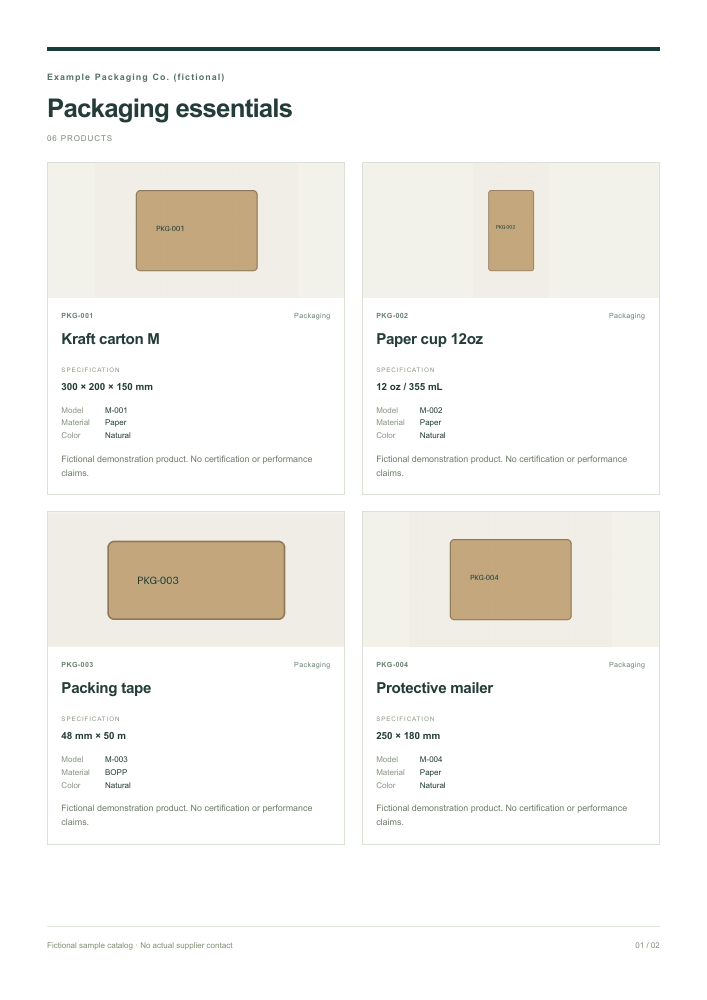
TWO WAYS TO PUT YOUR PRODUCTS TO WORK
Ready for the next conversation.
Send a PDF to a buyer, or share a web file they can browse and search. Both use your checked product information.
All examples are fictional. Product photos are synthetic illustrations.
ONE CHECKED WORKFLOW
From your product list to a finished file.
- 01 · Check your list
Use the standard spreadsheet. Codes and specifications stay as supplied. Fix highlighted cells in the original file and import it again.
- 02 · Connect your photos
Add JPEG or PNG photos. Each filename must match the spreadsheet exactly, including case and extension.
- 03 · Review and save
Use the Clean Business template. Review the pages, then prepare a PDF or download a web catalog that opens offline.
Start with Load sample data → Load sample photos → Build preview inside the maker. Default details are enough to try both formats.
TRY BEFORE USING YOUR OWN FILES
Everything for a six-product trial.
Fictional packaging products and synthetic illustrations. Download the files or load them directly in the maker.
- Excel templateStandard columns with text cells
- CSV sampleUTF-8 · six fictional products
- Sample photosSix JPEG files · unzip before adding
- Sample PDFClean Business · generated from the demo
- Sample web catalogOne HTML file · opens without internet
BEFORE YOU START
Keep your information accurate.
Spreadsheet and photo limits
XLSX or UTF-8 CSV, up to 5 MiB and 100 products. Product cells must be text, including codes with leading zeros. Required columns: product_code, product_name, specification and image_filename. Optional: model, description, color, material and category.
JPEG/PNG only: up to 5 MiB and 20 megapixels per image, 50 MiB combined. Names are case-sensitive. Duplicate or missing photos must be resolved. Shared photos need your confirmation. The downloaded photo ZIP is a sample bundle; the maker accepts individual images, not ZIP files.
Saving a PDF or web catalog
PDF: choose Prepare PDF, then Save as PDF. In the browser dialog use A4, portrait, 100% scale, no margins, and turn headers and footers off. Enable background graphics for template colors. Browser print support and fonts may affect the result.
Web: choose Download web catalog. All products, company details and resized photos are included, even when search hides some products. The file opens offline. Photos use previews up to 480 pixels; keep your original photos for other uses. HTML exports are limited to 20 MiB.
Correcting an error or starting again
Fix spreadsheet errors in your original file and choose it again. Match photo filenames exactly, remove invalid or duplicate files and retry. Photo corrections keep company details. Rebuild the preview after changes. If an A4 card is too long, review its description or save the full web version.
Clear file removes the current product list, photos, company details and temporary catalogs. Reopening the page starts a new workspace. Saved or shared copies stay on your device until you delete them.
Browser support and current demo limits
Desktop Google Chrome is the tested browser for this demo, especially for PDF saving. Firefox and Safari compatibility is still being verified. Mobile layouts support reviewing data and web catalogs. Compatibility evidence and remaining gaps are recorded in the project report; this demo is not a promise of support for every browser or printer.
This version provides one template. It has no account, payment, automatic translation, shopping cart or automatic public catalog link. You must check the factual accuracy of your product information before sharing.
YOUR FILES STAY WITH YOU
Local processing. Clear sharing choices.
The maker reads product lists and photos in browser memory. It does not upload these files, store your catalog on a server, use AI APIs. Optional usage statistics are described below. Clearing the workspace or leaving the page releases temporary data. Downloaded catalogs contain the product and company information you chose to include.
Visiting a hosted site still sends ordinary page requests to its hosting provider, which may process connection information such as IP addresses. This is separate from uploading your product files. Do not include confidential information in feedback or shared samples.
Help & requests
The separate request form sends only your request type, message and optional reply email to Cloudflare after you review and submit. It accepts no attachments and does not include your product workspace. Only the authorized administrator can read requests. Records are removed by the next daily cleanup after 90 days; deleted records may remain in D1 recovery history for up to 7 more days. We do not send request contents to usage analytics. Your hosting and security providers may process connection information, so we do not promise complete anonymity. The administrator uses a separate Google/Firebase login; customers do not need an account.
Optional usage statistics
Statistics are off until you allow them. PostHog receives fixed visit and workflow event names, whether you used samples or your own files, and a temporary random ID that resets on each page load. We do not send product names, company or contact details, filenames, spreadsheet contents, photos, search terms, page URLs or error messages. We use no session recording, automatic click capture or persistent visitor identifier.
PostHog receives network connection information when a request reaches its US service. Project settings discard stored IP addresses and our events disable location enrichment. Events on the free plan may be retained for up to one year; the operator reviews and deletes data through PostHog. Your allow/decline choice is stored on this device for 30 days. Use Usage privacy in the footer to change it; declining stops future events but cannot recall events already received. Browser privacy signals are respected. Downloaded catalogs contain no usage tracker.
Counts cover consenting page loads and actions, not exact individual people. Blockers, lost connections, declined collection and our own test visits can affect results. A PDF dialog or download request does not prove that a file was saved.
HELP SHAPE THE DEMO
Tell us where you got stuck.
Tell us about a problem, a feature you need, or a question. No account or name is required. A reply email is optional.
- Could you create both files with the sample data?
- Which step or message was unclear?
- What would you need before using this for your business?
Include browser name and device type if helpful. Share no customer files or private contact information. Requests are private to the administrator. Without a reply email we cannot send you an answer.
Create a sample catalog